In this article I will explain how to check whether a proxy is working.
We will use several proxy checkers that I personally use in my work.
I use proxy checkers with the ability to test a proxy against a specific domain — for example, checking access to https://www.instagram.com/ through a proxy.
FOGLDN Proxy Tester
The first proxy checker is single-threaded, checks proxies one at a time, and supports the HTTP/S proxy protocol.
A free proxy checker from FOGLDN. It allows you to measure the response time of a proxy to any website. Supports proxies with login/password authentication as well as IP-based authentication.
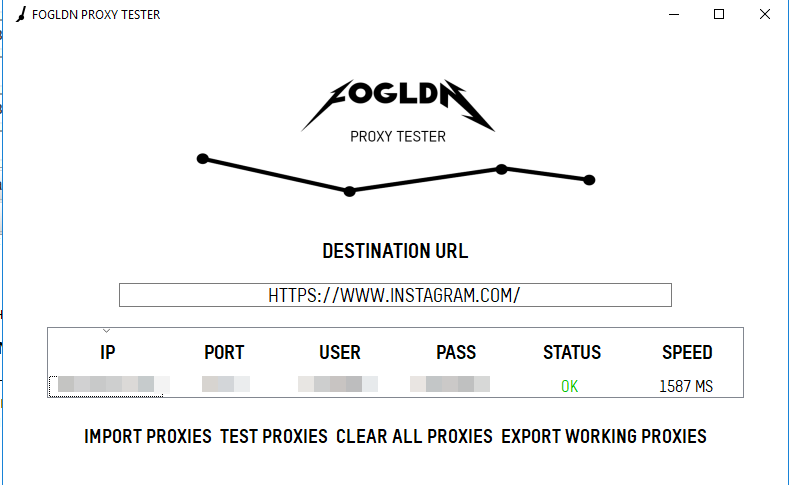
Official website of the proxy checker https://www.fogldn.com/project/proxytester/
Web Proxy Checker
The second proxy checker is multi-threaded — you can set the number of threads and the timeout for waiting for a proxy response. It can export all valid and invalid proxies to a file after checking, which is very convenient.
All proxies sold on this website have access enabled to the IP check site https://www.dnsleaktest.com. So feel free to test proxies purchased from this store by entering https://www.dnsleaktest.com as the check URL (see screenshot below).
A useful trick — it is sometimes helpful to know how many simultaneous threads a proxy can handle, since it may be limited programmatically or by server/network performance.
To test this, I duplicate 1 proxy 1000 times and feed it to the proxy checker with a set number of threads. If invalid results appear at 100 threads, I reduce the number of connections and check again until invalid results are minimal. This way you can test proxy multi-threading.
This is especially relevant for mobile proxies, where the seller limits the number of connections and states how many are available in the plan.

Threads — number of threads
Timeout — time to wait for a proxy response
Check for URL — checks whether a website is accessible through the proxy (does not always work correctly)
The software has many settings. You can learn more on the official website
http://optinsoft.net/wpc.php
The paid version is available there. But you can also download the free version.
Just in case, I am attaching an older working free version. You can download the installer from Yandex Disk at https://yadi.sk/d/ALkY_VTp3XLEcy
The free version has some limitations. See the website for details.