
Have questions?
Write to us and we'll help you ASAP


ProxyFarm — software to run your mobile proxy farm
Without our software a proxy farm is just a box of modems and an SSH prompt. With it you get a service you run with a mouse: every modem, every proxy and every client in plain sight. The licence is counted per modem.
- SIM cards on smartphone tariffs work
- IMEI change
- TTL and TCP fingerprint (p0f) change
- VPN on the same modem: VLESS with Reality, and Outline
ProxyFarm License
Software for your proxy farm
ProxyFarm license
Manage your own mobile proxy farm. Licensing is per modem. Updates and support included.
Software license for your mobile proxy farm. One seat is one modem. Updates and support included.
Supported devices
Sierra Wireless EM7455 / MC7455 / EM7455B
Tandem 4GT
Installation requirements
x86 mini-PC, Ubuntu Server 24.04 LTS, Ethernet, externally powered USB hub. ZTE MF289F: support in development.
Download and activation
After payment or a trial request, the ISO appears under ProxyFarm in your account. Install the system and submit its hardware fingerprint from Help to obtain a key.
Trial: 7 days, up to 10 modems. One trial per account.
ProxyFarm License
Software for your own mobile proxy farm: manage modems, clients, IP rotation, quotas and limits from a web panel. Access the installation ISO in your account after payment.
Take a walk through the proxy farm control panel
This is not a screenshot — switch the tabs and see how the panel actually works.
- Shows at a glance what the farm is short of: CPU, memory or disk space.
| Port | Status | Signal | Carrier | IP (CGNAT) | IMEI | Mode | Proxy | Actions |
|---|---|---|---|---|---|---|---|---|
| 1 | connected | 92% | MegaFon | 100.121.159.95 | 352843055613316 | qmi | 1081 | Manage ⟳ Restart |
| 2 | connected | 78% | MegaFon | 10.240.221.169 | 359289041220118 | qmi | 1082 | Manage ⟳ Restart |
| 3 | connected | 64% | MTS | 100.89.55.24 | 359333072284500 | qmi | 1083 | Manage ⟳ Restart |
| 4 | connected | 41% | Beeline | 10.185.173.143 | 352843052531370 | qmi | 2084 | Manage ⟳ Restart |
| 5 | no-sim | 0% | — | — | 352811047793777 | qmi | 1085 | Manage ⟳ Restart |
| 6 | connected | 88% | MegaFon | 10.112.123.119 | 359746041569943 | qmi | 3086 | Manage ⟳ Restart |
| 7 | connected | 71% | MTS | 100.70.227.150 | 352843059416450 | qmi | 1087 | Manage ⟳ Restart |
| 8 | connected | 55% | T2 | 10.1.76.244 | 359300044245612 | qmi | 1088 | Manage ⟳ Restart |
| 9 | connected | 83% | MegaFon | 100.113.132.236 | 352811044329773 | qmi | 2089 | Manage ⟳ Restart |
| 10 | connected | 47% | Beeline | 10.188.87.66 | 359746047328534 | qmi | 1090 | Manage ⟳ Restart |
| Port | Protocol | Auth | Client | Quota | Rotation | Actions |
|---|---|---|---|---|---|---|
| 1081 | socks5 / http | u1 : •••••• | Alpha Media | 120 / 500 GB | 15 min | Link Quota Logs |
| 1082 | socks5 / http | by IP | Alpha Media | 340 / 500 GB | by link | Link Quota Logs |
| 1083 | socks5 / http | u3 : •••••• | Alpha Media | 78 / 500 GB | 15 min | Link Quota Logs |
| 2084 | vless | by key | Beta Traffic | 90 / 300 GB | manual | Link Quota |
| 1085 | socks5 / http | u5 : •••••• | Beta Traffic | 0 / 300 GB | manual | Link Quota Logs |
| 3086 | outline | by key | Beta Traffic | 52 / 300 GB | 30 min | Link Quota |
| 1087 | socks5 / http | by IP | Gamma Agency | 210 / 400 GB | by link | Link Quota Logs |
| 1088 | socks5 / http | u8 : •••••• | Gamma Agency | 164 / 400 GB | 30 min | Link Quota Logs |
| 2089 | vless | by key | Gamma Agency | 52 / 400 GB | manual | Link Quota |
| 1090 | socks5 / http | u10 : •••••• | Alpha Media | 96 / 500 GB | 15 min | Link Quota Logs |
| Name | Contact | Proxies | ↓ | ↑ | Active | Portal |
|---|---|---|---|---|---|---|
| Alpha Media | @alpha_ops | 4 | 218 GB | 26 GB | yes | Link |
| Beta Traffic | @beta_team | 3 | 94 GB | 11 GB | yes | Link |
| Gamma Agency | @gamma_adm | 3 | 100 GB | 11 GB | yes | Link |
| Time | Event | Where to look | Details |
|---|---|---|---|
| 14:52 | Proxy port stuck | hub 11-2.4.2, port 3 | no IP · 3d |
| 13:18 | Modem back | hub 7-3.2, port 4 | MegaFon · LTE |
| 13:17 | Modem dropped | hub 7-3.2, port 4 | USB disconnect |
| 11:40 | Hub revived | hub 11-2.4 | watchdog revived it |
| 09:05 | Modem quarantined | hub 7-3.2, port 4 | 245 drops in 30 min |
| Login | Role | Active | Created | Actions |
|---|---|---|---|---|
| admin | administrator | yes | 12.03.2026 | Password Edit |
| operator | operator | yes | 04.06.2026 | Password Edit |
| audit | viewer | no | 21.07.2026 | Password Edit |
- Three roles: the administrator sees everything, the operator works with proxies and clients but not system settings, the viewer only looks.
- The last administrator cannot be removed or demoted — not even by themselves.
- Signature and checksum are verified, the update installs into a separate slot, and any failure rolls back automatically.
Demo data. In your farm these will be your own modems.
What the proxy farm software does
Dashboard
Modems online, active proxies, inbound and outbound traffic, rotations over the last day. A 24-hour traffic chart, per-modem signal and rotation history — all on one screen. The box's own load is right there too: CPU, load average, memory, swap, disk, temperature and uptime, on colour-coded bars, so a shortage of resources shows up before your clients feel it.
Modems
Status, signal level, carrier, IMEI, CGNAT address and operating mode for every modem. Restart, rotate, switch to QMI and assign a port — with buttons, no console.
Proxies
SOCKS5 and HTTP on a single port, plus VLESS and Outline. Authentication by login and password or by IP. A ready-to-use connection string and share link, copied in one click.
IP rotation
On a schedule, via a link from an external system, or by hand from the panel. Every address change lands in the history: time, port, new IP and what triggered it.
Clients and portal
Create clients and give each one a personal portal with their own proxies. Traffic is metered per client: how much came in, how much went out, and where it went.
Quotas and limits
A traffic quota in gigabytes and an expiry date on any protocol. SOCKS5 and HTTP add a speed cap, a concurrent-connection limit and daily, weekly and monthly caps. When the quota runs out the proxy pauses itself.
Event log
Modem drops and recoveries with the exact hub and physical port. Your operator does not see "something broke" — they see where to put their hands.
Watchdogs
The farm repairs itself: it revives latched USB hubs, quarantines a flapping modem before it takes the others down, and surfaces proxy ports that are stuck and never come back.
Device fingerprint (p0f)
TCP fingerprint rewriting inside the kernel: five profiles — Android, Windows, iOS, none, and a mirror of the real client. Profiles were verified against live devices. Mirroring is available for SOCKS5 and HTTP.
Over-the-air updates
A new version installs from the panel with one button. The signature is verified, and if the farm does not come back up the rollback happens on its own.
Per-modem DNS
Every modem uses its own carrier resolver, so lookups never leak around the tunnel and give the farm away.
Runs on your side
The panel lives on the box itself, inside your network. We never see your traffic and keep none of your data.
Proxy farm technical specifications
Everything below comes from the shipping product, not from a roadmap. Where a figure depends on conditions, we say so.
Hardware
- Modems
- Sierra Wireless EM7455 / MC7455 / EM7455B, LTE Cat-6
- SIM cards
- Cards on smartphone tariffs work
- IMEI change
- Supported — the modem presents itself as a different device
- TTL change
- Changed together with the TCP fingerprint (p0f); for SOCKS5 and HTTP on the fly, without dropping sessions
- LTE routers
- Tandem 4GT (Cat-6) — supported
- Coming soon
- ZTE MF289F (Cat-12) — support in progress
- Modem mode
- QMI (raw-ip). A new modem in MBIM is switched over with a button in the panel, ~15 s
- USB hub
- Cascaded, externally powered — mandatory
- Computer
- Any x86 mini-PC with USB and wired Ethernet
- Operating system
- Ubuntu Server 24.04 LTS, installed from a ready-made image
- Kernel
- 6.8 or newer
Capacity
- Proven in production
- 40 modems on a single box
- Typical delivery
- A 10-port hub
- Theoretical ceiling
- ~150 ports (routing-table numbering limit)
- Licence
- From 10 seats. A seat is a modem, no matter how many proxies run on it
IP rotation
- Mechanism
- Airplane mode — a full reconnect to the carrier
- Dwell time
- 12 seconds — tuned so the carrier actually hands out a new address
- Modes
- Manual · by timer (interval per proxy) · by secret link
- Automation
- A GET on the link returns old → new; fits scripts and antidetect browsers
- Safety
- Never more than one rotation at a time on the same modem
Network and DNS
- Per-modem DNS
- Lookups go through the same modem to the carrier resolver — no leak to the host site
- Box uplink
- DHCP · static IP · PPPoE · L2TP/IPsec
- Network rollback
- If connectivity is lost after applying, settings revert automatically in ~20 s
- IPv6
- Not supported
Access and security
- Panel
- HTTPS with a certificate generated per box; HTTP is redirected
- Address
- https://proxyfarm.local:8080 on your local network, by name
- Roles
- Administrator · operator · viewer
- Login protection
- 5 failures in 10 minutes → 15-minute lockout; passwords stored as PBKDF2-HMAC-SHA256
- Isolation
- The panel and SSH are blocked on modem interfaces — admin never faces the internet
- Audit
- Actions are recorded in the database on the box
Updates and licence
- Updating
- From a button in the panel. There is no automatic check
- Update security
- Signature and checksum verified; installed into a separate slot with automatic rollback
- Data on update
- Proxies, clients, counters and configs are left untouched
- Without a licence
- The panel opens and a key can be activated, but the proxies are stopped
- Grace period
- 7 days after expiry — full functionality with a warning
Protocols
A single modem can run several services at once — for example SOCKS5, VLESS and Outline sharing one IP.
| Protocol | Default port | Authentication |
|---|---|---|
| SOCKS5 | 1080 + hub port number | Login and password · by IP · none |
| HTTP | 1080 + hub port number | Login and password · by IP · none |
| VLESS (+ Reality) | 2080 + hub port number | By key (UUID) |
| Outline / Shadowsocks | 3080 + hub port number | By key |
- For VLESS and Outline the panel produces a ready-made link and a QR code the client scans with a phone. Works with v2rayNG, Hiddify and sing-box.
- Reality disguises VLESS as another site. The masking domain must support TLS 1.3, X25519 and HTTP/2 — not every domain qualifies.
- Proxy lists export to a text file in four line formats.
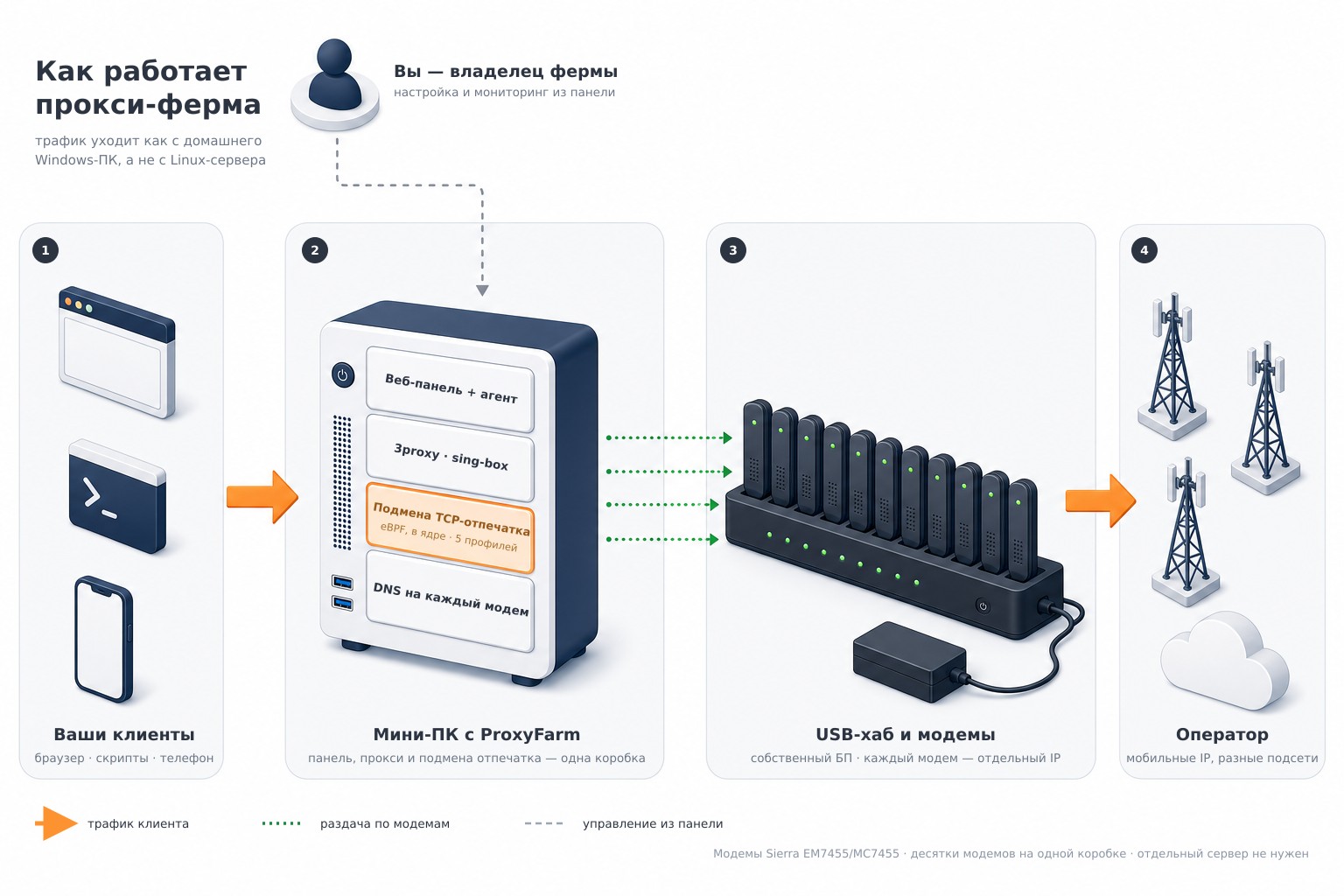
How a proxy farm is built
From the client application to the carrier network: where the panel sits, what the proxies run on, and at which point the TCP fingerprint is rewritten.
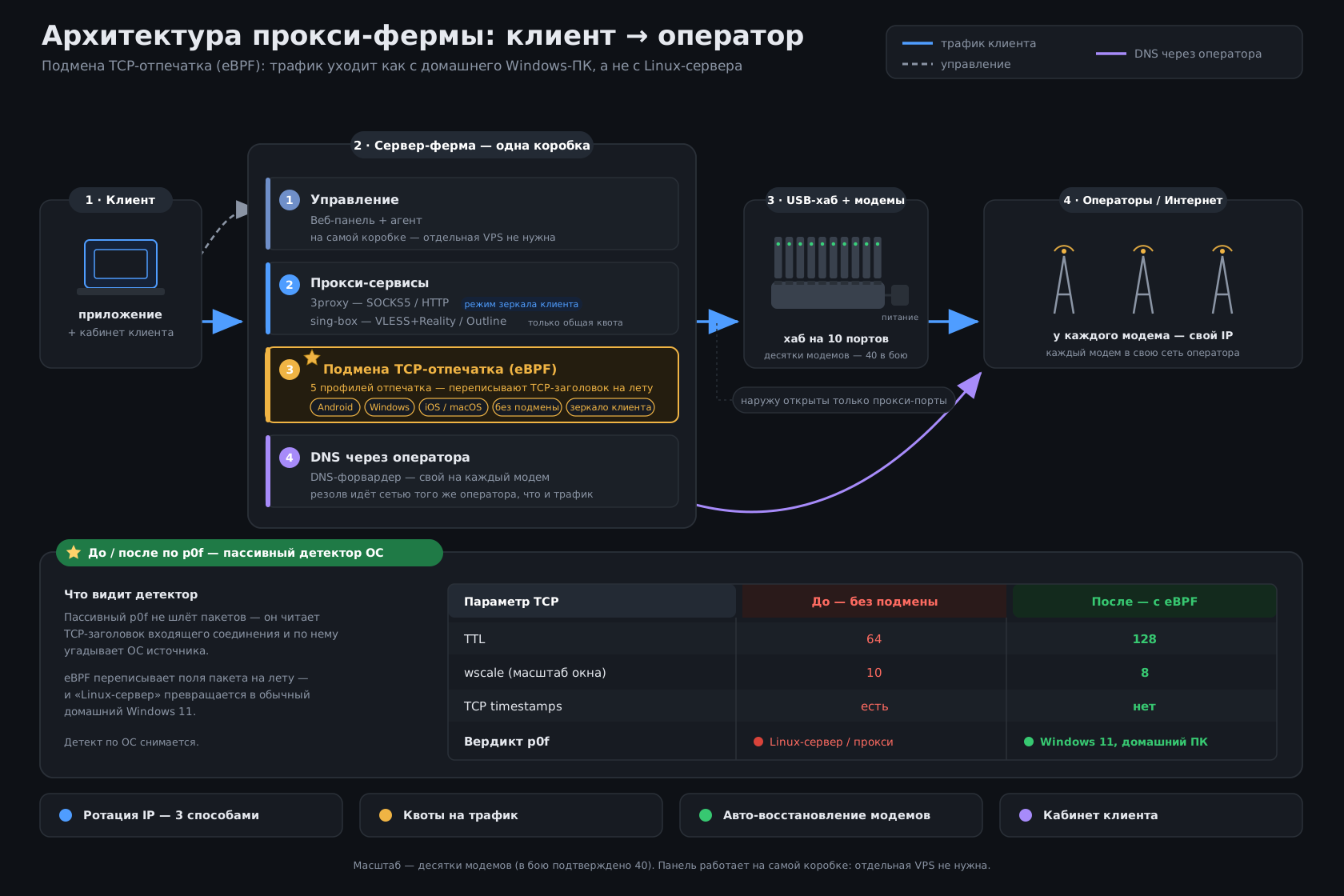
TCP fingerprint profiles (p0f)
Rewriting happens inside the kernel, not in the proxy application, and covers the whole connection rather than just its opening. Profiles are taken from real devices and match them byte for byte.
p0f (Passive OS Fingerprinting) means working out the operating system from its networking handwriting. A site does not have to ask you anything: it simply looks at how your machine composes the very first packet of a connection — which values it puts into the TCP/IP headers and in what order it lists the options.
Android, iPhone and Windows each have their own stable handwriting, and a Linux server has one too — recognisable from the first packet. The method is called passive because it needs no JavaScript, no cookies and not a single request to you: looking at what you already sent is enough.
This is why a mobile IP alone no longer suffices. The address says "a phone on a mobile carrier", and the very first packet answers "no, this is a server". Our profiles bring the handwriting in line with whatever the proxy is presenting itself as.
Limits by protocol
| Capability | SOCKS5 / HTTP | VLESS / Outline |
|---|---|---|
| Traffic quota in GB and expiry date | ✓ | ✓ |
| Traffic accounting and charts | ✓ | ✓ |
| Speed cap | ✓ | — |
| Concurrent-connection limit | ✓ | — |
| Daily, weekly and monthly caps | ✓ | — |
| Connection logs in the panel | ✓ | — |
- When the quota runs out or the term ends, the proxy pauses itself — checked every 2 minutes.
Proxy farm software licence pricing
You pay per modem, not per box. The software ships with the farm — the licence covers its use and support.
Examples
| Farm | Monthly | Yearly with discount | Without discount |
|---|---|---|---|
| 10 modems | 1 000 ₽ | 10 800 ₽ | 12 000 ₽ |
| 20 modems | 2 000 ₽ | 21 600 ₽ | 24 000 ₽ |
| 40 modems | 4 000 ₽ | 43 200 ₽ | 48 000 ₽ |
- A licence seat is a modem, not a proxy. One modem can run SOCKS5, VLESS and Outline at the same time and still counts as a single seat.
- License for 30 or 365 days. A 365-day license includes a 10% discount.
- You can grow the farm at any time and only pay for the new modems.
- After the term ends there is a 7-day grace period: everything keeps working and the panel warns you.
The licence: updates and support
Farm software is not a box you write to a disk once. Carriers change their networks, hardware fails, anti-fraud keeps learning: the product is alive and keeps being worked on, and that is what the licence pays for.
New versions install from the panel with one button
Check and install under "Help". The package is digitally signed, goes into a separate slot, and if the farm does not come back up the rollback to the previous version happens on its own. Proxies, clients, counters and configs are left untouched. There is no automatic check: you update when you decide to, not when we feel like it.
Fixes reach a farm that is already running
The latched-hub watchdog, the flapping-modem quarantine and the dead-proxy-port detector were not in the first release — they were added after those failures showed up on live farms. A box on a valid licence gets things like this with the next version.
We work through failures with you
Write to us on Telegram or by email. The conversation stays concrete: the event log on the box names the exact hub and physical port rather than saying "something broke", and the panel shows load, signal and rotation history per modem.
The farm does not stop the day the term ends
After expiry there is a 7-day grace period: everything keeps working in full and the panel warns you. After that the proxies stop, but the panel still opens and a key can be activated — your data and settings stay where they are.
Why the farm software matters more than the hardware
An operator runs the farm, not an engineer
A mouse instead of SSH and config files. Someone with no Linux background can add modems, hand out proxies and keep an eye on the farm.
You see faults before your client does
The panel surfaces the dropped modem, the latched hub and the dead proxy port by itself. You learn about the problem before a complaint arrives.
You pay per modem, not per box
The licence counts modems and does not care how many proxies you run on them or how much traffic you push. Grow the farm and you only pay for the new modems.
The farm is entirely yours
No dependence on proxy vendors and no sharing IPs with anyone. Location, carriers and SIM cards are your call.
How to deploy a proxy farm and run it
- Everything is managed from a web panel in the browser. No console, no SSH: modems, proxies, rotation, limits and clients are all configured with a mouse.
- Delivered as a disk image: write a bootable USB stick, install it and power the box on. It personalises itself on first boot — unique hostname, keys, passwords and disk expansion.
- No separate server or VPS required. The panel, the agent and the database all live on the box itself.
- The panel opens at https://proxyfarm.local:8080 on your local network — no need to know the IP. The certificate is generated individually on every box.
- Only the proxy ports are exposed outwards, and you forward those on your own router. The panel and SSH are blocked on the modem interfaces and never face the internet.
- If you plan to use the proxies remotely, order a "Static IP" service from your wired ISP.
Proxy farm software: frequently asked questions
What is a proxy farm and why does it need dedicated software?
A proxy farm is a computer with a USB hub and mobile modems that hands out mobile proxies. Without software you run such a farm over SSH and by editing config files: every new proxy, every rotation and every limit is a separate operation in the console. ProxyFarm replaces that with a web panel — modems, proxies, IP rotation, clients and quotas are configured with a mouse, and the state of the farm is visible on one screen.
How much does a proxy farm software licence cost?
100 ₽ per modem / 30 days, minimum 10 modems. A 365-day license includes a 10% discount. One seat is one modem regardless of proxy count.
Which modems does the software support?
Sierra Wireless EM7455, MC7455 and EM7455B — LTE Cat-6. The whole stack is written for them: session bring-up, rotation and composition switching. The Tandem 4GT (Cat-6) LTE router is also supported. Support for ZTE MF289F (Cat-12) is in progress. SIM cards on smartphone tariffs work, IMEI can be changed, and so can the TTL and the TCP fingerprint.
Do I need a separate server or VPS for the control panel?
No. The panel, the agent and the database all live on the box itself. The panel opens at https://proxyfarm.local:8080 on your local network — you never need to know the IP. Only the proxy ports are exposed outwards; the panel and SSH are blocked on the modem interfaces and never face the internet.
How is this different from a home-made farm on 3proxy?
A home-made 3proxy farm means config files, your own rotation scripts and a monitoring setup you have to write and then keep fixing. Here scheduled and link-triggered rotation, traffic quotas, speed and connection caps for SOCKS5 and HTTP, per-client accounting, a modem-drop log naming the exact hub and port, and watchdogs that revive latched USB hubs are all built in and driven from the browser.
Can the software be installed on a farm I already built?
Yes, provided the farm uses supported modems. The software ships as a disk image: write a bootable USB stick, install Ubuntu Server 24.04 LTS onto the box and power it on — it personalises itself from there. Any x86 mini-PC with USB and wired Ethernet will do; the USB hub must be cascaded and externally powered. 40 modems on a single box are proven in production.
Network fingerprint (p0f) rewriting — available separately from the farm
Sites stopped looking at the IP alone a long time ago. Before a page is served they read how exactly your machine opens the connection — this is what p0f, passive OS fingerprinting, means — and conclude it is a server, not a phone. A mobile IP alone is no longer enough here: it confirms the geography and the carrier, but says nothing about the device behind it.
What our solution does
How this differs from the usual approaches
How it works inside
The rewriting lives in two places: a program inside the kernel that rewrites the packets, and a rebuilt proxy server that tells the kernel which profile to apply to each connection.
socks -p1088 -Dowwan-port8 -of0 -osTCP_NODELAY -ocTCP_NODELAY
- What gets rewritten: TTL, window size, window scale, the set, order and length of the TCP options, and the behaviour on subsequent packets — not merely the first packet of the connection. That is why neither a repeat connection nor a long session slips past the check.
- Works for IPv4. Mirroring the client fingerprint is available for SOCKS5 and HTTP.
We will explain what a measurement on your own traffic would show, and demonstrate the result before you buy.
Contacts
For feedback write to Telegram @frigate_admin
Our email support@frigate-proxy.ru
You can also write to the online chat on this page.
Company Details
Website: frigate-proxy.ru
Individual Entrepreneur: Baktasheva Anastasiya Yuryevna
ITN: 563102071671
PSRNSP: 321565800014442
Registered: 26.02.2021, Interdistrict IFTS No. 10 for Orenburg region
Address: 460019, Orenburg, Sharlykskoe sh., 1/2
Phone: +79325409073
E-mail: support@frigate-proxy.ru
Telegram: @frigate_admin
Have questions?
Write to us and we'll help you ASAP