Contents
- What an antidetect browser is and why it needs a proxy
- What people actually use: data instead of reviews
- The browser gives itself away before you open a site
- Where this audience goes and why it is hard there
- Why an antidetect browser is not enough
- Who is responsible for what
- Which proxies suit an antidetect browser
- How to connect a proxy in an antidetect browser
- What to check before buying
- When your own proxy farm makes sense
- What else links accounts
- Common mistakes
- Frequently asked questions
- In short
Plenty has been written about antidetect browsers, and almost all of it by the companies that sell them. The result is predictable: every review explains why one browser beats another, while the proxy for antidetect browser gets a single line in the settings section — enter host, port, login and password.
We look at this from the other side. We sell mobile proxies and build proxy farms, so this traffic physically passes through our servers. Instead of speculating, we opened the logs: 3.37 billion rows, 35 servers, 1 June to 10 August 2026 — and looked at what people actually use, where they go, and what fails for them.
One honest note before we start. Our clients are mostly in Russia and Kazakhstan. The numbers below describe that audience, not the global market. They are still worth reading, because nobody else publishes numbers like these at all — but treat them as a large regional sample, not a worldwide census.
What follows is what reviews cannot tell you: the real distribution of browsers among paying clients, the traces those browsers leave without being asked, and above all why a perfectly configured antidetect does not save you if the proxy underneath reports something else. We will go through which proxies for antidetect browsers work, which ones burn accounts, and how to check that before you buy rather than after the first bans.
What an antidetect browser is and why it needs a proxy
In short: an ordinary browser tells the site honestly who you are. Operating system version, screen resolution, the set of installed fonts, language settings, the way graphics are rendered through Canvas and WebGL, supported codecs, the number of CPU cores — all of it adds up to a stable fingerprint. That fingerprint recognises you on your next visit even after you log out, clear cookies and change your password.
It is stable precisely because it is assembled from dozens of small things. A screen resolution on its own is shared by millions of people. But that resolution plus a specific font set plus a graphics driver version showing through in Canvas rendering is already an almost unique combination.
An antidetect browser substitutes these parameters. Each profile is a separate virtual environment with its own set of characteristics: one looks like a MacBook in St Petersburg, another like an office PC on Windows in Almaty. Profiles are isolated from each other — separate cookie storage, separate cache, separate settings. The platform is not supposed to guess that one person is behind all of them.
But substituting the fingerprint solves only half the problem. The other half is the address you arrive from. Ten flawlessly different profiles released into the internet through one IP are linked instantly, by the most obvious signal of all. That is why an antidetect browser with a proxy is not an option but a mandatory pair: the browser is responsible for how you look, the proxy for where you came from.
And this is where it gets interesting. Because "where you came from" is far more than an IP address.
What people actually use: data instead of reviews
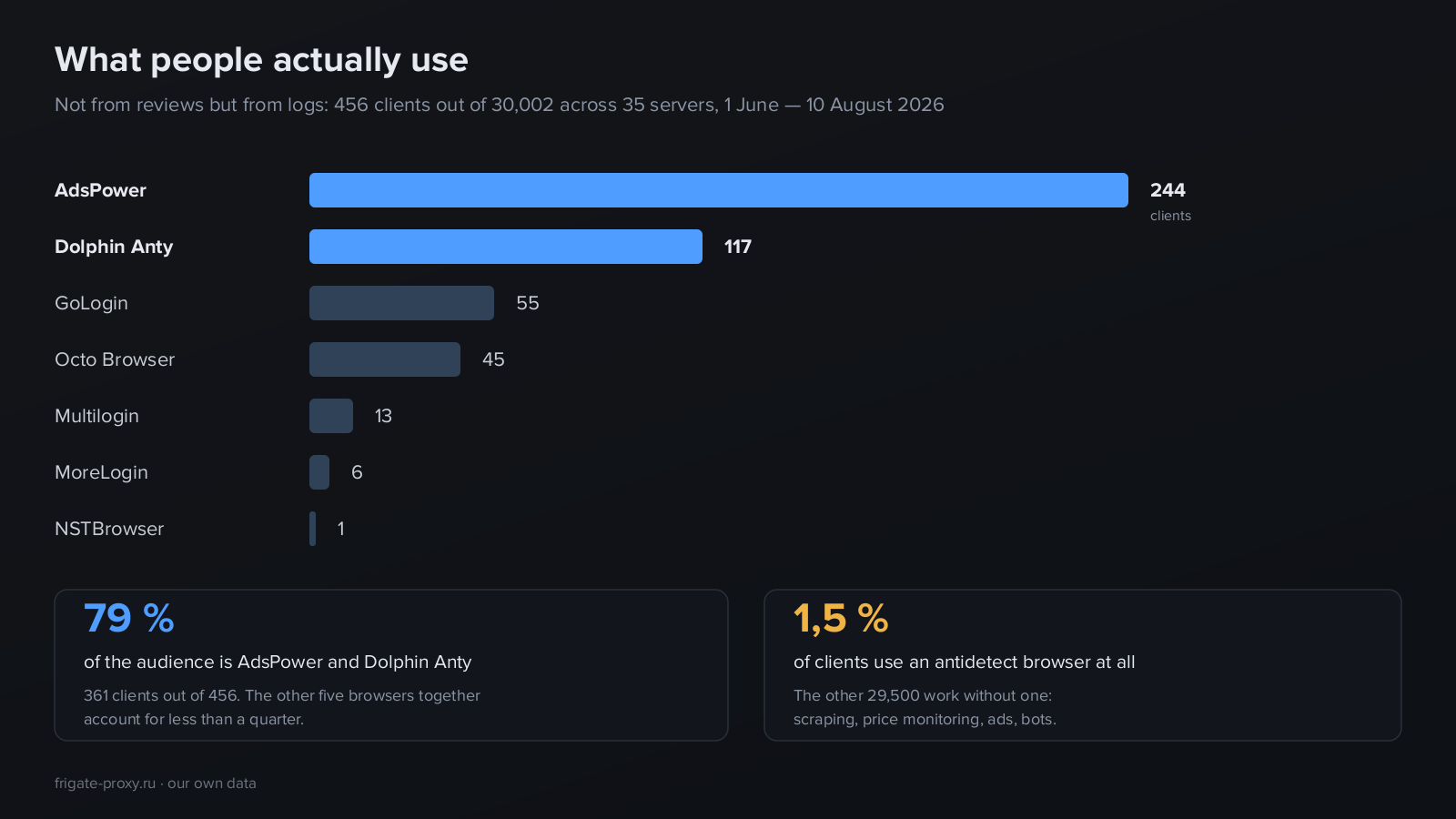
An antidetect browser leaves a distinctive trace in proxy logs. It periodically contacts its vendor's servers — to check the licence, sync time, look up its external address. Those requests travel through the same proxy as the working traffic, which means they identify the browser a client is running.
We collected those requests across all servers over 70 days. Here is the result.
| Browser | Clients |
|---|---|
| AdsPower | 244 |
| Dolphin Anty | 117 |
| GoLogin | 55 |
| Octo Browser | 45 |
| Multilogin | 13 |
| MoreLogin | 6 |
| NSTBrowser | 1 |
The first thing that stands out: antidetect browsers are used by a minority. 456 clients out of 30,002 — one and a half per cent. The other twenty-nine and a half thousand work without one entirely: catalogue scraping, price monitoring, advertising, bots, checking search results. An antidetect is needed where a live account sits on the other side and can be blocked, and there are fewer such tasks than the volume of articles on the subject suggests.
The second: the market belongs to two players. AdsPower and Dolphin Anty together account for 361 clients out of 456 — close to four fifths. The remaining five browsers combined do not reach a quarter. Reviews dutifully list a dozen options, but in real work the choice narrowed long ago.
MoreLogin deserves a separate note. By request count it looks like a significant player — 43,000 requests. But it has only six clients, which means over seven thousand requests each. That is not popularity, it is one or two very active users. Counting by requests instead of by people distorts the picture — and we nearly fell for it ourselves on the first pass through the data.
The same trap waited for us with Dolphin. Our first count gave 162 clients, but going through the raw domains revealed that some of them were a diving club, a travel agency and a restaurant equipment supplier whose websites also contain the word "dolphin". After cleaning, 117 remained. The lesson is simple: any figure about a market deserves a look at how exactly it was counted.
What to know about the leaders
AdsPower is the most widespread, with extended automation: it has a built-in task scheduler that runs scenarios without external scripts. That is what explains its share among people managing hundreds of accounts.
Dolphin Anty grew out of the affiliate marketing scene and is noticeably more popular among those working with ad accounts. It has a lower barrier to entry and a generous free tier, which explains second place.
GoLogin and Octo Browser occupy a smaller niche — 55 and 45 clients. Octo is known for not limiting the number of devices you can install it on, GoLogin for its cloud version that runs without installation.
An important caveat: this is not a quality ranking. It is a measurement of what the clients of one regional proxy provider use. An audience with different tasks in a different country will show a different distribution.
The browser gives itself away before you open a site
Those service requests we used for the statistics are not harmless telemetry. Look at the numbers more closely.
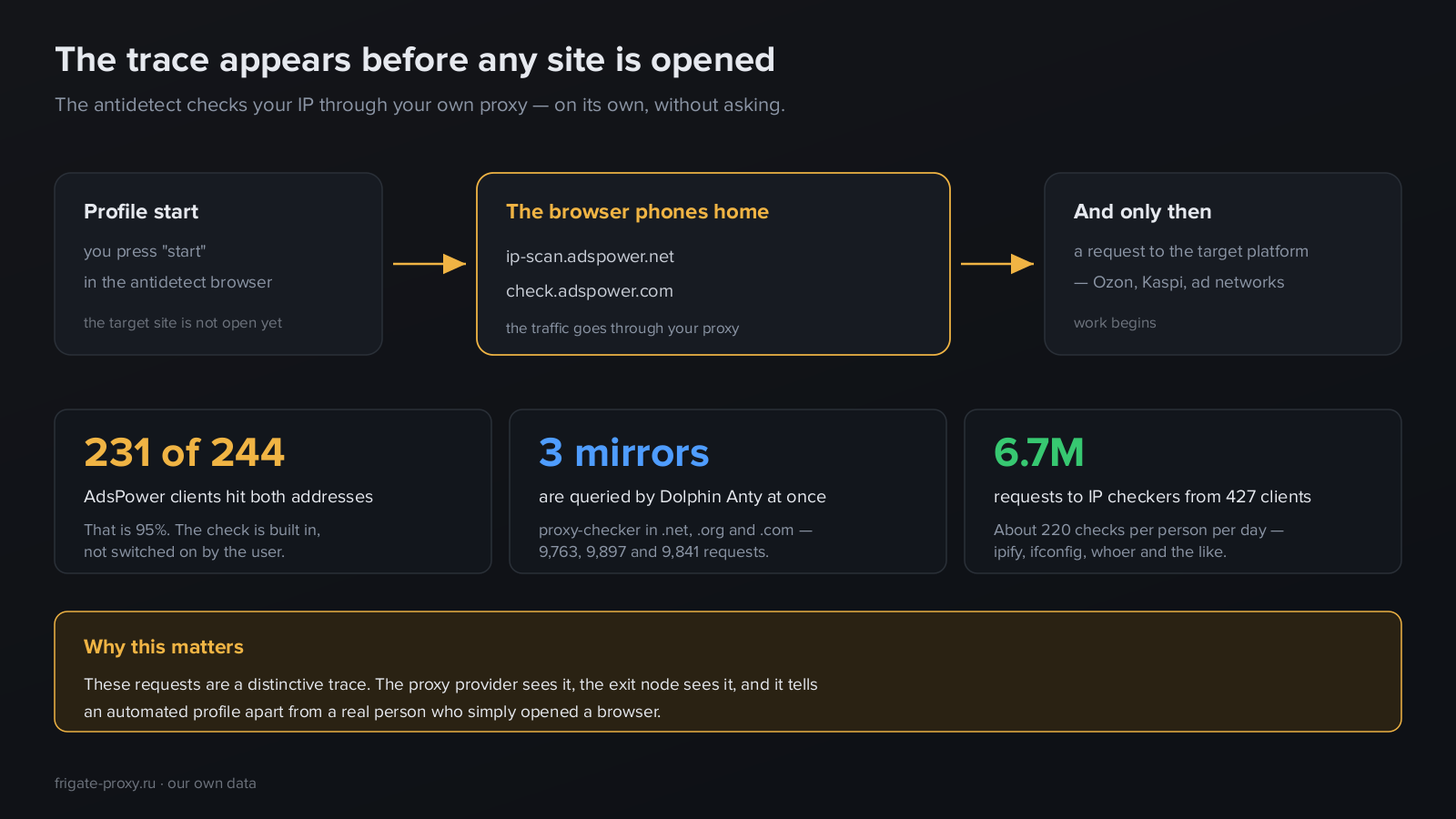
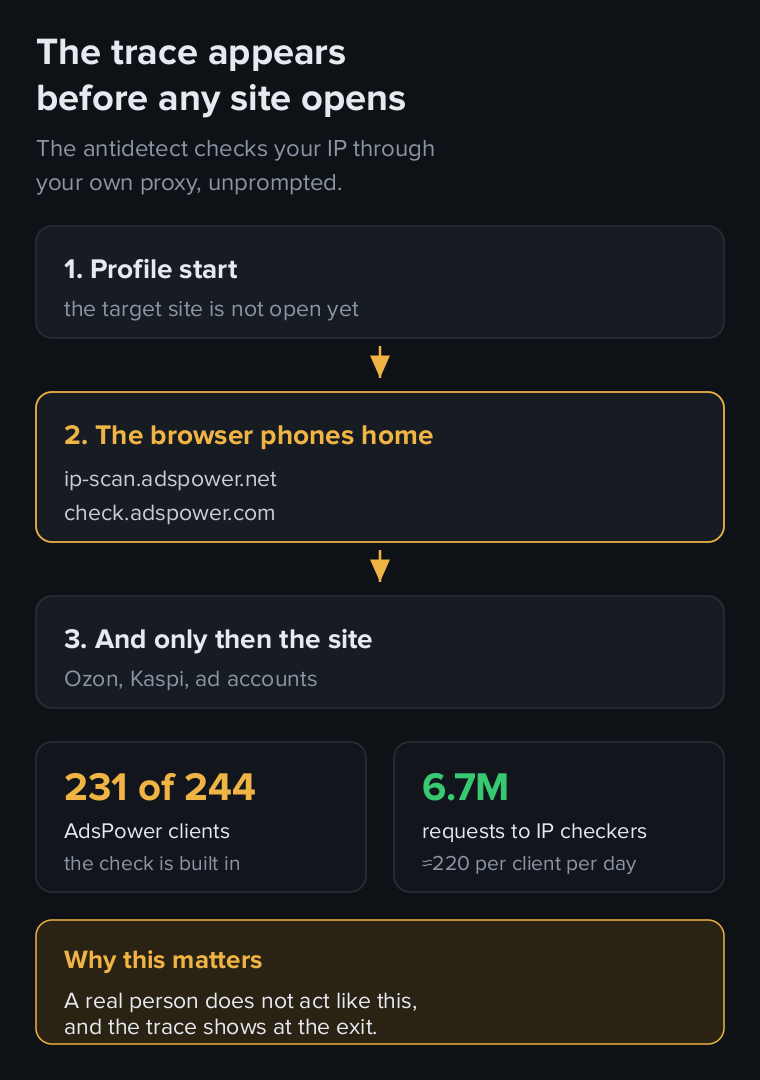
On profile start, AdsPower knocks on two addresses — ip-scan.adspower.net and check.adspower.com. 231 clients out of 244 pass through them, that is 95% of users. This is not a setting somebody enabled: the check is built into the browser and runs by itself, every time a profile starts.
Dolphin Anty is more inventive — it queries three mirrors of the same service, in the .net, .org and .com zones, and almost evenly: 9,763, 9,897 and 9,841 requests. The mirrors exist in case one domain gets blocked, and the browser hits all three at once rather than waiting for a failure.
Add ordinary IP checkers to that — ipify, ifconfig, whoer and the like. We counted 6.7 million requests from 427 clients, roughly 220 checks per person per day. People worry about their address and verify it again and again, sometimes automatically before every action.
What this means in practice.
First, all this traffic is visible to your proxy provider. It passes through their servers, and the domains are visible even when the contents are encrypted. We see it, for example — which is exactly how this article came to exist.
Second, it is equally visible at the exit node, and therefore potentially available to the platform if it analyses traffic beyond its own domain. A real person opening a browser to visit a shop does not behave this way: they do not check their IP two hundred times a day and do not contact three mirrors of a proxy checking service.
This is not a reason to abandon antidetect browsers. It is worth understanding, though, that a tool hiding you on one layer simultaneously leaves a noticeable trace on another. And if your proxy provider can tell from the logs which browser you use, that information is in principle available to others too.
Where this audience goes and why it is hard there
We looked at which platforms are opened by clients where an antidetect browser was detected.
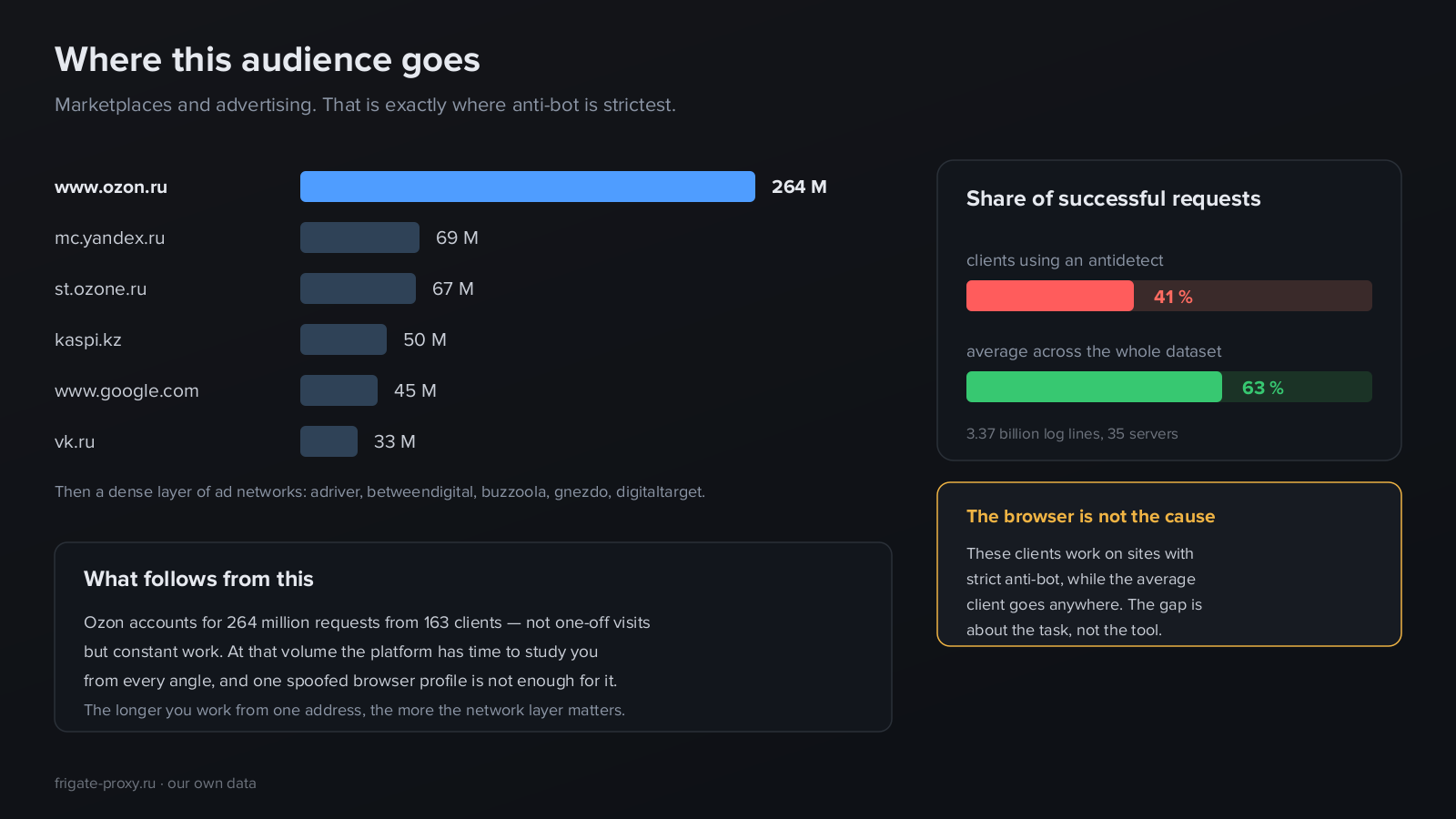
| Platform | Requests |
|---|---|
| www.ozon.ru | 264M |
| mc.yandex.ru | 69M |
| st.ozone.ru | 67M |
| kaspi.kz | 50M |
| www.google.com | 45M |
| vk.ru | 33M |
The picture is unambiguous: marketplaces and advertising. Ozon — the largest Russian marketplace — accounts for 264 million requests from 163 clients. Kaspi, the dominant Kazakh marketplace and payment ecosystem, adds 50 million from 78 clients. Then come VK, Google and a dense layer of ad networks such as adriver, betweendigital and buzzoola.
The presence of Kaspi deserves a mention of its own: it shows the audience is not confined to Russia, and a significant share of the work happens on the Kazakh market. The ad networks point to the second large scenario — affiliate marketing, where accounts in ad platforms are the actual asset.
Note the scale: 264 million requests is not a series of one-off visits but sustained work over months. And here an effect appears that deserves an honest explanation.
Among clients with antidetect browsers the share of successful requests is 41%, against 63% across the whole dataset. A gap of one and a half times.
It is tempting to declare the antidetect guilty. That would be substituting correlation for cause, and we are not going to do it. We compared the distribution of response codes across the entire database and saw the reason: clients with antidetects work on platforms where anti-bot is strict and deliberate, while the average client goes wherever, and nothing stands in their way. The gap describes the task, not the tool.
The practical conclusion is a different one. If your work is Ozon, Wildberries or Kaspi at a volume of millions of requests, the platform has time to study you from every angle. It sees not a single visit but a long history: when you come, how long you stay, what you look at, how fast you move between pages. One substituted browser profile is not enough for that. It is exactly at this volume that the layer below starts to decide the outcome.
Why an antidetect browser is not enough
Here is the central point of this article, and it is short.
An antidetect browser works at the application layer — where the page lives. It controls what your browser sends: request headers, Canvas and WebGL rendering, the font list, time zone, screen resolution, interface language. The platform receives all of it once the page has begun loading.
But the connection starts earlier. The very first packet your machine sends carries technical parameters of the operating system: packet time to live, the size and scale of the receive window, the set and order of protocol options. Windows has one combination, Android another, a server Linux a third, and they differ consistently, because they are set by the system kernel rather than by an application.
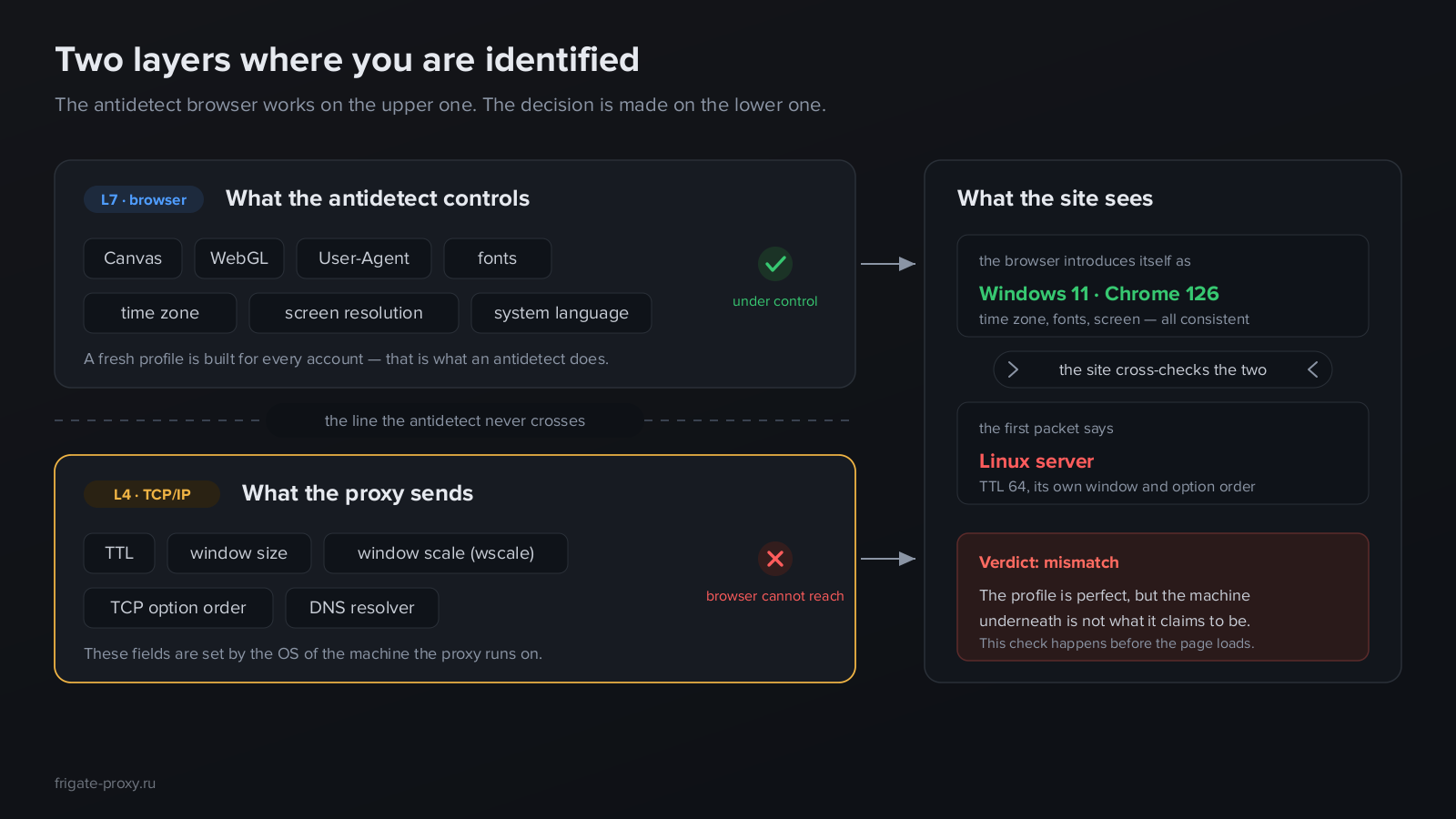
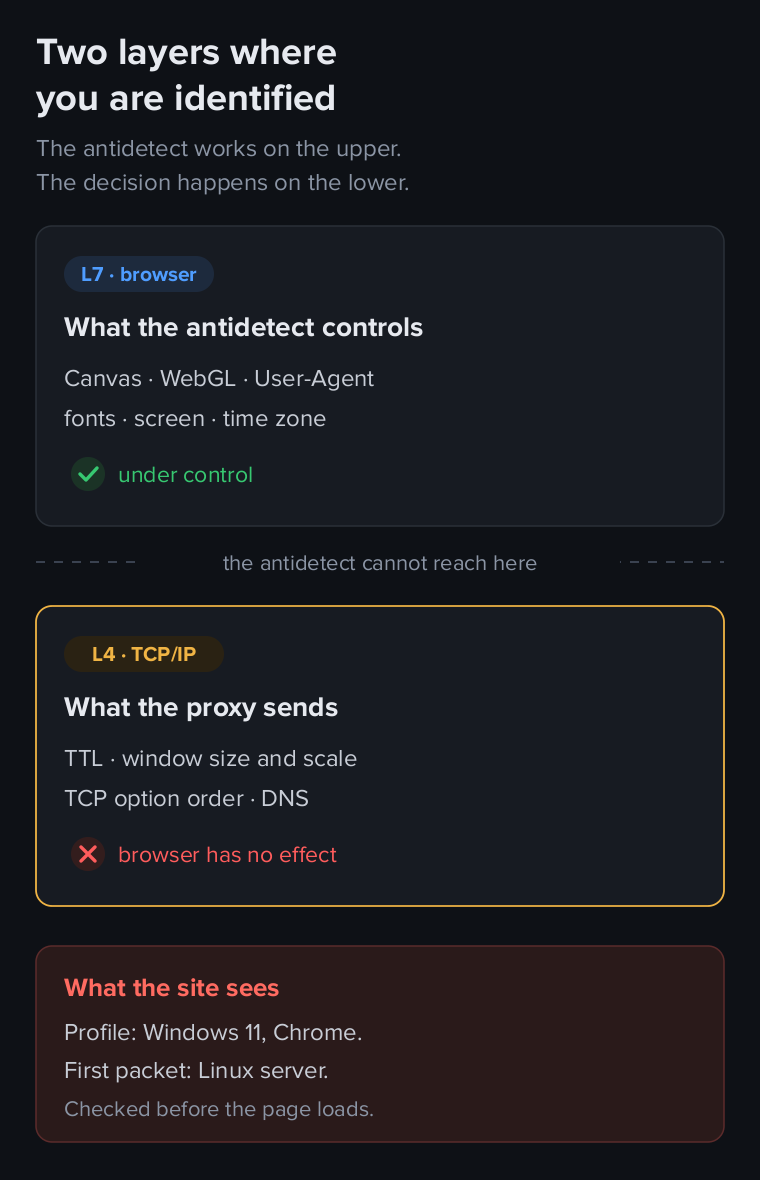
The result is a contradiction. The profile swears it is Windows 11 with Chrome, the time zone is right, the fonts match, the screen resolution is typical for a laptop. And the first packet answers: "Linux server."
The browser cannot reach down here — not because the developers were lazy, but because it is somebody else's territory. These fields are formed by the operating system of the machine the proxy server runs on, not by a program running on your computer. No setting in the antidetect interface affects them, because physically it cannot.
The moment at which this happens matters just as much as the fact itself.
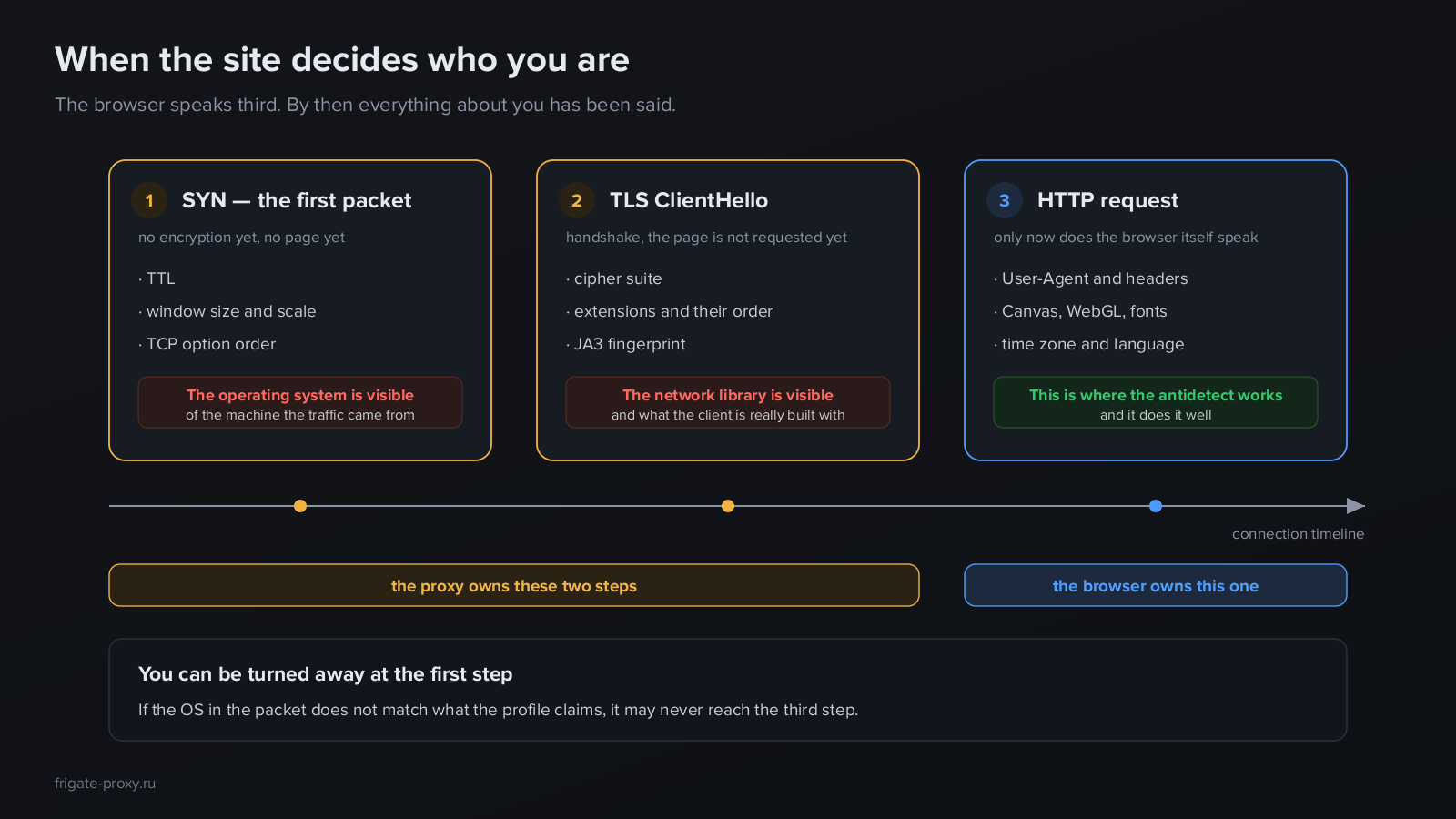
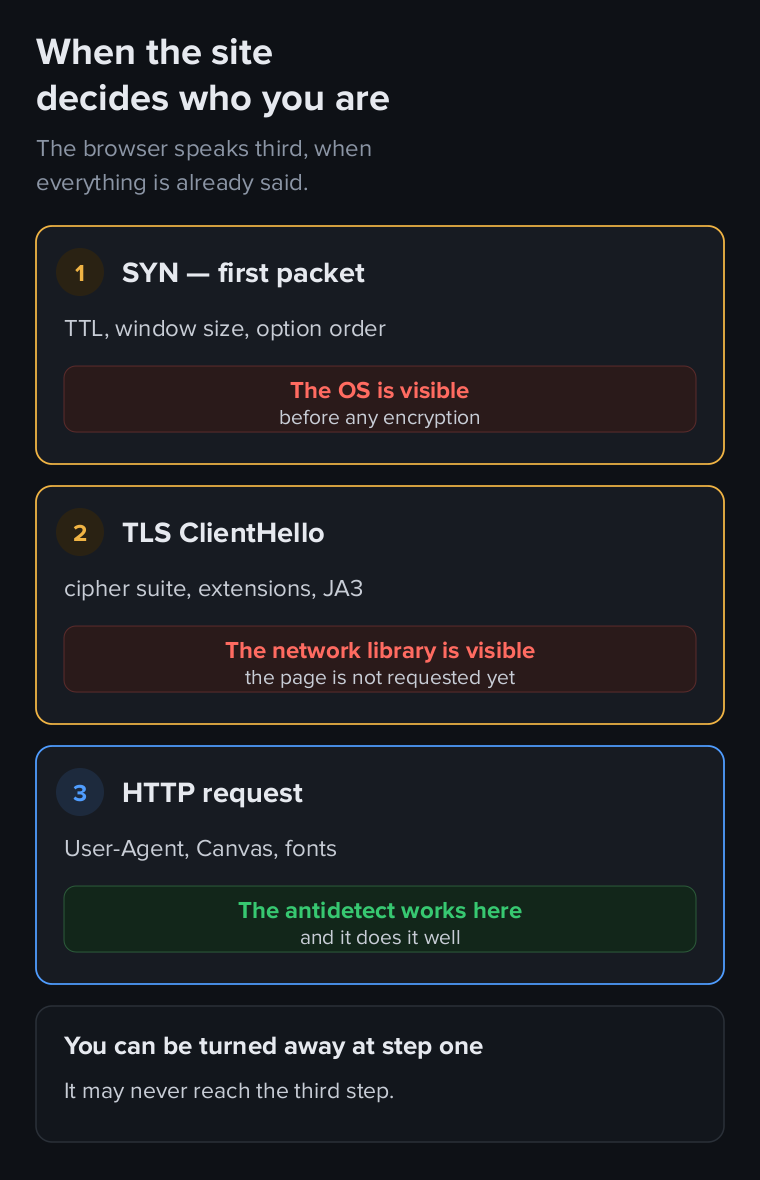
The browser speaks third. First the opening packet goes out, and the operating system is visible in it. Then comes the TLS handshake, where the cipher suite, the list of extensions and their order identify the network library the client is built with. Only then is the HTTP request sent, with the User-Agent and everything else the antidetect controls.
By that moment enough has been said about you to justify a refusal. And a refusal does not necessarily look like a ban: the platform may simply serve a captcha, trim the results, hold an action for review, or quietly lower trust in the account to act on it later.
We covered the mechanics of this detection in a separate piece — how passive OS fingerprinting works in mobile proxies: specific field values, the p0f tool, and how Android differs from a server at packet level. Here the principle is enough.
Who is responsible for what
The division of responsibility is rigid, and it is convenient to keep it in mind as one table.
| What the platform sees | Antidetect browser | Proxy |
|---|---|---|
| Canvas and WebGL | yes | — |
| User-Agent and headers | yes | — |
| Fonts and screen resolution | yes | — |
| Time zone and language | yes | — |
| IP address and its geography | — | yes |
| TTL | — | yes |
| TCP window size and scale | — | yes |
| TCP option order | — | yes |
| DNS resolver | — | yes |
| OS fingerprint in the first packet | — | only if the proxy can do it |
The upper half is the browser's territory, and there it does its job. The lower half belongs to the proxy, and the browser cannot reach it at all. The last row is the one worth all of this: the operating system fingerprint in the first packet is substituted by nobody. Not by the browser, because it cannot. Not by an ordinary proxy, because it simply forwards packets as they are.
That field stays honest by default — and tells the platform exactly what is really there. Only a proxy with this implemented deliberately, at kernel level, can change it.
Which proxies suit an antidetect browser
Now the practical part. Several requirements follow from everything above, and they matter more than the price per gigabyte.
One profile, one address
The rule sounds obvious, yet it is broken constantly: people buy one proxy and run a dozen profiles through it, because "the browser substitutes everything anyway".
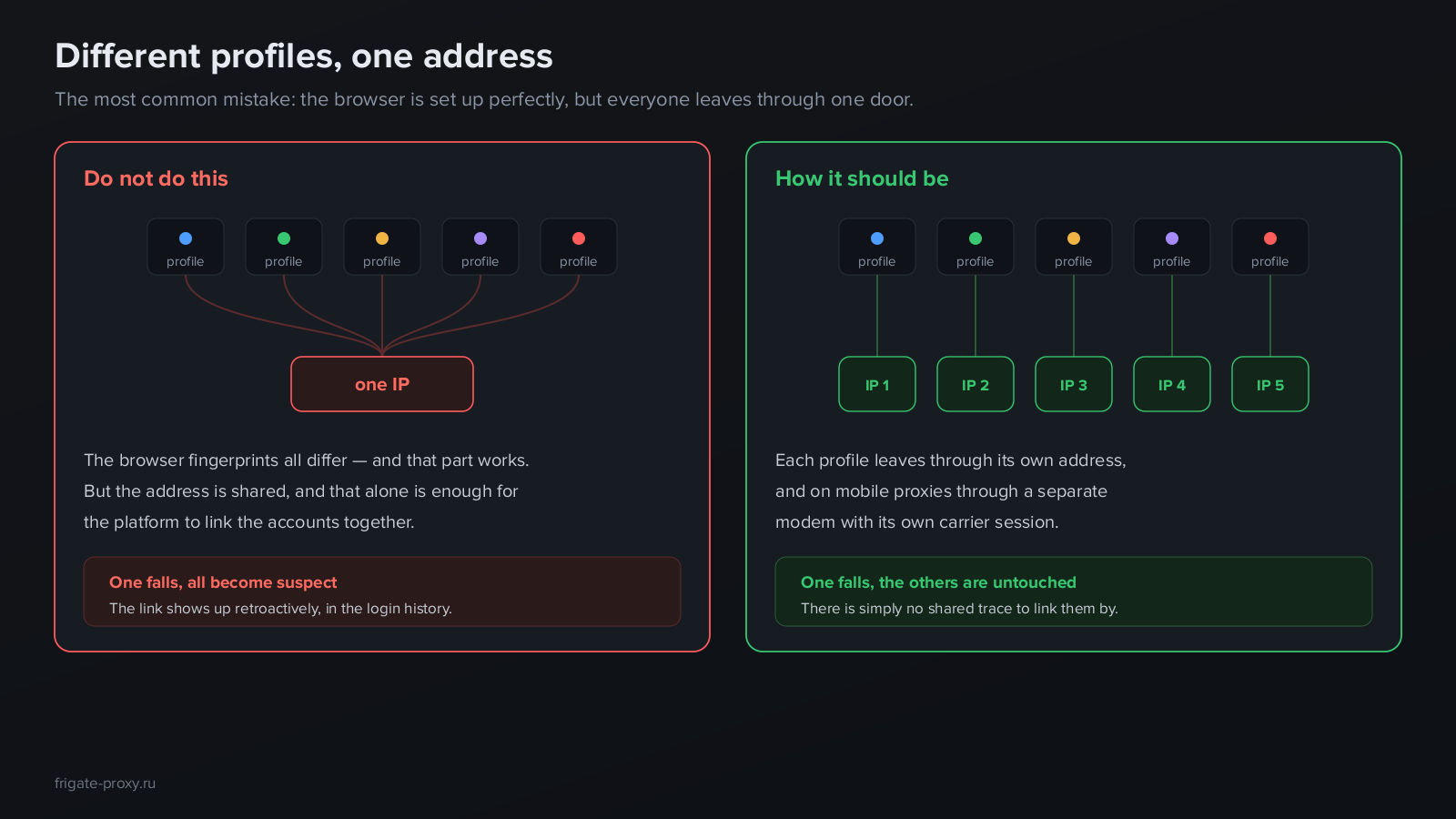
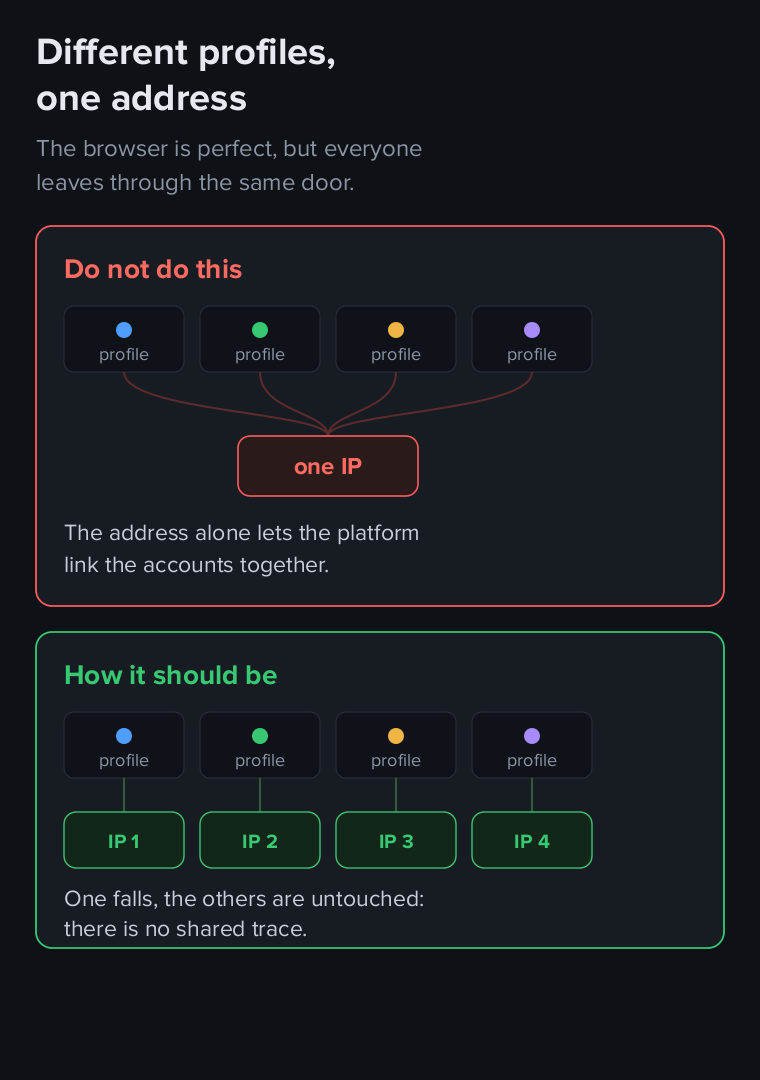
The browser does substitute — at its own layer. But the address stays shared, and that is enough for the platform to link the accounts. The link is visible retroactively too: login history is kept for years, and when one account falls, every other account that logged in from the same address comes under suspicion. Sometimes this surfaces months after the scheme seemed to be working.
Mobile, residential or datacentre
Datacentre proxies are the addresses of hosting providers. They are cheaper, faster and more stable than anything else, but their datacentre origin is visible in public databases and any platform detects it instantly. For scraping open catalogues that does not matter; for working with accounts it is an immediate reason to look closer.
Residential proxies are the addresses of home internet providers. They look like ordinary users, but most often they are somebody else's devices passing your traffic. Hence two problems: unpredictable speed and no control at all over who used that address before you.
Mobile proxies reach the internet through real carrier networks, and their address is the same kind an ordinary subscriber with a smartphone gets. The key difference is that hundreds of live people work behind the same carrier address at once, because of how mobile addressing works. Blocking such an address wholesale is unprofitable for a platform: it would cut off everyone else along with you. There is more on how they work in what mobile proxies are.
For an antidetect browser handling valuable accounts, mobile is the sensible choice. For mass scraping without accounts, datacentre proxies are enough and there is no point overpaying.
Controlled address rotation
Rotation is not always needed, but when it is, it must be controllable. Rotation on a timer in the middle of an active session breaks the work: the platform sees a user suddenly move to another city without closing the tab or ending the session. For an account that looks more suspicious than a constant address.
The working approach is rotation on request, where you decide the moment: finished with one account, changed the address, started the next. Technically this is usually a link you can call from a script, or from the antidetect browser itself if it can run external commands between sessions.
One more thing worth asking a provider: is the new address guaranteed to differ from the old one? Carriers frequently hand back the same one, and without a repeat check rotation becomes a formality.
DNS must not leak around the carrier
A subtlety rarely remembered, and it deserves better. If a proxy routes traffic through a mobile carrier but resolves domain names through a public DNS such as Google, a mismatch appears: the exit address is mobile while DNS queries come from somewhere else. For a platform that looks at such details it is one more sign that this is not an ordinary user.
On a properly configured proxy, DNS queries go to the resolver of the same carrier the rest of the traffic goes through — exactly the way it happens on a real smartphone.
How to connect a proxy in an antidetect browser
The mechanics are much the same everywhere, only the field names differ. In the profile settings you choose the connection type, then enter the server address, port and credentials.
SOCKS5 or HTTP. For an antidetect browser SOCKS5 is almost always better: it works at a lower level and passes traffic without interfering with its contents, whereas an HTTP proxy parses requests and may add service headers of its own. The difference is not critical, but extra headers are extra differences from an ordinary user.
Authentication. Two options: login and password, or binding to your IP, where the provider lets you through without a password from a specific address. The second is more convenient for automation but requires a static address on your side.
Checking after connection. Do not stop at the browser's built-in "check" button — it usually shows only the IP and country. Open a service that reports the detected operating system through the profile and compare it with the OS the profile claims. If the profile says Windows and the service says Linux, you have just seen the exact mismatch this whole article is about.
One profile, one pairing. Do not reuse a proxy between profiles even temporarily, "just to try". Login history is stored on the platform side, and a single crossover stays in it forever.
What to check before buying
A short list worth going through before you buy proxies for an antidetect browser — rather than after the first blocks.
- The operating system fingerprint. Ask directly whether it is substituted and at what level. If the answer is about the User-Agent, you are being answered about something else: the User-Agent is the browser's job, and the question is about TCP packet parameters set by the system.
- Who else sits on this address. On a private mobile proxy the modem is yours and so is the carrier session. On a shared one the address is split with neighbours, and their behaviour becomes your problem — you will never know what they did before you.
- How rotation works. On a timer, by link, manually? Is there a check that the new address actually differs from the previous one?
- Where DNS queries go. The resolver should belong to the same carrier the traffic goes through, not to a public service.
- What happens on a disconnect. The modem reconnects, the address changes — will your browser notice, or will the profile carry on as if nothing happened?
- Whether you can see the logs. Being able to see which domains passed through your proxy and with which response codes saves hours of investigation when something stops working.
- Whether there is a trial. One day of work on a real task tells you more about a proxy than any description page.
One more thing: do not believe the phrase "our proxies never get banned". Proxies are not banned, accounts are, and the platform decides that on a combination of signals of which the address is only one. A seller promising otherwise either does not understand how this works or is counting on you not understanding.
When your own proxy farm makes sense
Renting proxies is convenient while there are few profiles. Once there are dozens and the work runs for months, the arithmetic changes: you pay for addresses that are not yours, and you can lose them at any moment — the provider raises prices, loses a carrier channel, or simply shuts down.
The alternative is your own proxy farm: a mini PC, a USB hub and modems with ordinary SIM cards. Each modem gives a separate address and a separate carrier session — exactly what the "one profile, one address" rule needs. You choose the location, the carriers and the number of modems yourself, and the addresses are shared with nobody and carry no history from before you.
This starts to make sense at roughly two or three dozen profiles, and only if the work is continuous rather than a one-off campaign. Below that threshold renting is simpler and cheaper — no hardware, nobody to maintain it, no dealing with carriers over SIM cards.
Count by total cost of ownership: equipment, SIM cards with their tariffs, electricity, the uplink and the time spent on maintenance. A farm pays off not because its proxies are free, but because rental grows linearly with the number of addresses while the cost of your own hardware does not.
What else links accounts
It would be dishonest to leave the impression that everything comes down to the browser fingerprint and the address. A proxy for antidetect browser closes an important part of the problem, but not all of it — and the rest is worth knowing so you do not build false expectations.
Behaviour. Typing speed, mouse movement, pauses between actions, the time of day you work. Someone running twenty accounts physically cannot run them differently, and a uniform rhythm of actions is noticeable. Neither the browser nor the proxy affects this.
Payment and contact details. One card, one phone number, one delivery address across several accounts is the most direct link possible, and it can only be solved organisationally.
Browser storage. Cookies, local storage, cache, identifiers the platform plants. Here the antidetect genuinely helps: profiles are isolated and one profile's data is invisible to another. But only if you actually work in different profiles rather than switching tabs in one.
Geographic consistency. A common mistake: the proxy address is in Kazakhstan, the profile time zone is Moscow, the interface language is Russian and the account currency is roubles. Each parameter is harmless alone; together they do not add up. When setting up an antidetect browser with a proxy, align these: the profile's time zone and language should match the country of the exit address.
The point is that protection works like a chain, and it is worth strengthening the weakest link. If ten profiles leave through one address, buying a more expensive antidetect changes nothing. And the other way round — perfect proxies for antidetect browsers will not save accounts that all share one payment card.
Common mistakes
The things we see most often in the logs, and which cost people accounts.
Checking the address and going straight to work. The client opens a checker, sees the right country, is satisfied and starts. But the checker showed only the IP — the operating system, DNS and everything else went unexamined. We see in the logs how an IP check is immediately followed by a visit to a marketplace, without a single intermediate verification.
Rotation during a session. The address changes on a timer in the middle of work, and the account "moves" to another city without closing the page. For a platform that looks worse than a stable address: real people do not travel like that.
One proxy for several profiles "temporarily". There is no temporary here: the crossover is recorded in login history and stays there forever, even if you separate the profiles an hour later.
A datacentre proxy for account work. Cheaper and faster, but the address's datacentre origin is identified from public databases in milliseconds. Fine for scraping catalogues, not for logging into an account.
Ignoring a time zone mismatch. A profile on Moscow time behind a Kazakh address is a discrepancy any checking script can see, because both parameters are available to the page directly.
Judging a proxy by its speed. Speed matters for scraping. For account work what matters far more is what the address reveals and how exclusively it is yours. A fast shared proxy is worse than a slow private one.
Frequently asked questions
Which antidetect browser should I choose
By our data, four fifths of the audience runs AdsPower or Dolphin Anty — with either of them you will not be alone when you need help or a guide. But choosing a browser solves only half the task: under any of them you need a proxy that will not give you away at the network layer.
Will free proxies do
No. A free address is shared by definition, hundreds of people with unknown tasks have passed through it before you, and its reputation is not yours. For an antidetect browser you set up to protect accounts, this defeats the purpose.
How many proxies do ten profiles need
Ten, if the profiles must remain unlinked. The saving is imaginary: a link through a shared address cancels out all the work spent configuring the profiles.
Are mobile proxies always better than datacentre ones
Not always — they cost more and are usually slower. For scraping open data, where there are no accounts and nothing to block, datacentre proxies are enough. Mobile ones are needed where a live account sits on the other side and the cost of a mistake is losing it.
How do I check that a proxy is not giving itself away
Open a service that reports the detected operating system through it and compare that with what the browser profile claims. If the service says Linux while the profile says Windows, the discrepancy exists — and the platform will see it too.
Does changing the IP help if an account is already under suspicion
Usually not. By that point the platform has linked the account not only to the address but to behaviour, action history and related signals. A new address does not erase what has accumulated — it only stops adding to it.
Do I need a separate proxy per account or per profile
Count by profiles, because a profile is what constitutes a separate identity in the platform's eyes. Several accounts belonging to one person inside a single profile is normal and natural: people really do log into several of their own accounts from one device.
In short
An antidetect browser is a necessary tool, but it covers one layer out of two. It controls what the page sends, and does that well. Everything that happens before the page loads — the first packet, the TLS handshake, DNS queries — belongs to the proxy.
That is why proxies for antidetect browsers are chosen not by price per gigabyte but by what they reveal about you at the network layer: whose address it is, who else sits behind it, where DNS queries go, and which operating system the platform sees in the very first packet. The browser will not cover that part for you, simply because it cannot reach it.
And a last observation from our logs: one and a half per cent of clients use an antidetect browser, but it is precisely those clients who work on the hardest platforms with the most valuable accounts. The cost of a mistake is highest in this group — which means the choice of a proxy for antidetect browser deserves more attention than the choice of the browser itself.